Push notifications
DinkyTask works without notifications too — you just have to keep logging in to check whether anything happened. Notifications solve that: the parent is told when there is actually something to do, and the child gets feedback on their own work.
The whole system is designed to send few but useful notifications. There is no daily flood of reminders, and every type can be switched on and off separately.
When does the parent get a notification?
There are three events, and you can control each one separately:
| Notification | When it is sent |
|---|---|
| Child submitted a task for review | When the child submits a task that requires parental review. Tapping the notification takes you straight to the task. |
| Child completed a daily plan | When the plan closes with every required task approved. |
| Child missed or failed a daily plan | When the plan closes with a required task unfinished, or when the time window expires. |
If there is more than one parent in the family, each of them is notified according to their own settings.
When does the child get a notification?
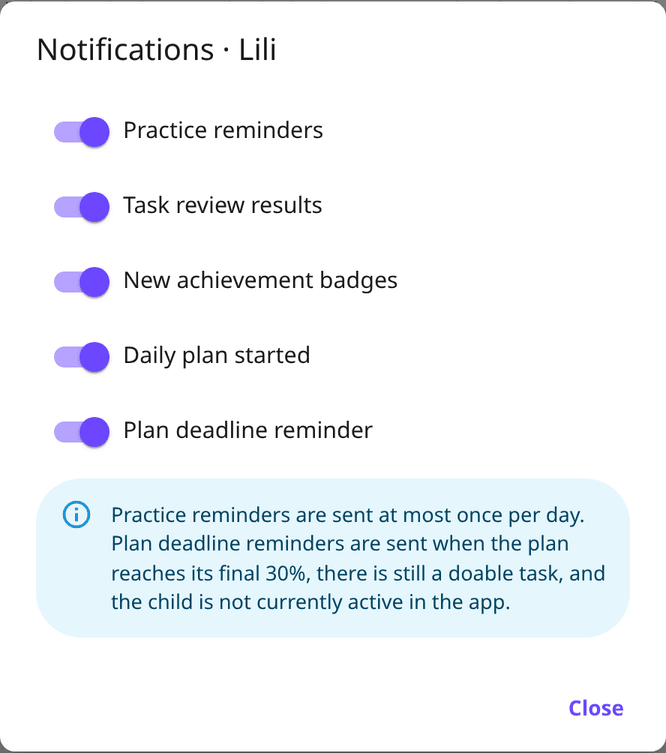
Five types can go to the child, and you control them per child:
| Notification | When it is sent |
|---|---|
| Daily plan started | When the plan's start time arrives and the tasks open up. |
| Task review results | When you approve a task, or send it back to be retried. |
| New achievement badges | When they earn a new badge. |
| Plan deadline reminder | Towards the end of the plan window, if there are still doable tasks. |
| Practice reminders | If they have study material with practice enabled that they have not attempted today. |
The exact rule for the deadline reminder
This is the most sensitive notification, so its conditions are strict. It is only sent if all four hold:
- the plan has entered the last 30% of its time window,
- there is still a task that can be done,
- the child is not currently active in the app,
- no such reminder has been sent for this plan yet.
So it arrives at most once per plan, and it does not interrupt someone who is already working.
The exact rule for practice reminders
The practice reminder is meant as gentle encouragement, not pressure. The child can receive at most one per day, and only if they have assigned study material with practice enabled, enough questions, an available reward, and no attempt started that day.
What is deliberately not notified
- The child is not told that their submission is waiting for you — that is your to-do, not theirs.
- There is no notification for every point credited; points arrive together when the plan closes.
- There is no "where is the child" or "what are they doing now" signal. DinkyTask is not a tracking app.
How to enable them
Push notifications are tied to a device and a browser, not to the account. So they have to be enabled separately on every device where you want to receive them.
- Open the app on the device where you want the notifications.
- Sign in with the relevant parent or child account.
- Open the Profile page.
- Expand UI settings and enable push notifications in the Notifications block.
- The browser will ask for permission — that has to be accepted too.
In the parent profile this is also where you switch the three parent notification types on and off, and where you see your subscribed devices — if you no longer use an old phone, you can unsubscribe it here.
The child's notification types, however, are set on the Family page, not here: under Notifications in the ⋮ menu next to the child's name.
If notifications do not arrive
- Install the app to the home screen. On iPhone and iPad notifications only work if you added the app to the home screen — see the iOS installation guide. On Android this is also the most reliable setup — see the Android guide.
- Check the browser permission. Once you have blocked it, DinkyTask can no longer ask; you have to re-enable it in the browser or operating system settings.
- Check battery saver mode. On some phones it stops background notifications.
- Separate device, separate permission. If it works on the phone but not on the tablet, you have not enabled it on the tablet yet.
A note on intent
Notifications exist to support daily progress, not to monitor the child continuously. If it feels like too much, switch off the types that are not useful for your family. Nothing else changes — the system just speaks up less often.